
How to Deploy SentinelOne Agent on macOS Using Intune
Step-by-step guide to deploy the SentinelOne macOS agent using Microsoft Intune with configuration profiles, PKG hosting, and automated tenant registration for secure endpoint protection.
On this page
Overview
This Knowledge Base article provides step-by-step instructions to deploy the SentinelOne agent on macOS devices using Microsoft Intune. This deployment method uses Intune configuration profiles and a shell script to install and register the agent automatically with your SentinelOne tenant.
Step 1: Upload SentinelOne PKG to Storage
Upload the PKG file to one of the following:
Recommended:
• Azure Blob Storage
• Secure Web Server
• Internal Repository
Example:
https://storageaccount.blob.core.windows.net/mac/Sentinel.pkgEnsure the URL is publicly accessible or accessible to devices.
Step 2: Deploying the Necessary Profiles
There are four profiles we need to deploy:
Network Monitoring
Privacy Control
Notifications
Network Filtering
All these Profiles you can get from here. We need to create a custom device configuration policy in Intune.
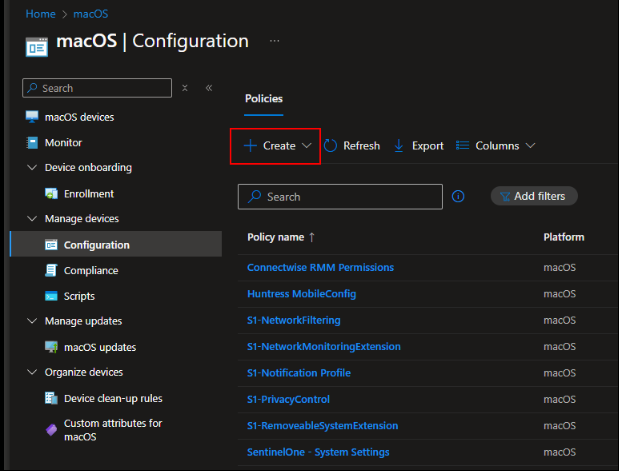
a) From Intune, navigate to devices > macos > configuration. Click Add
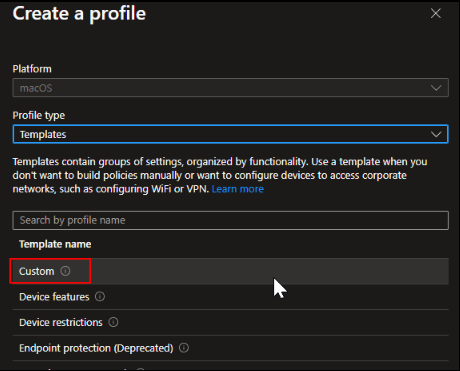
b) Then select Templates > Custom:
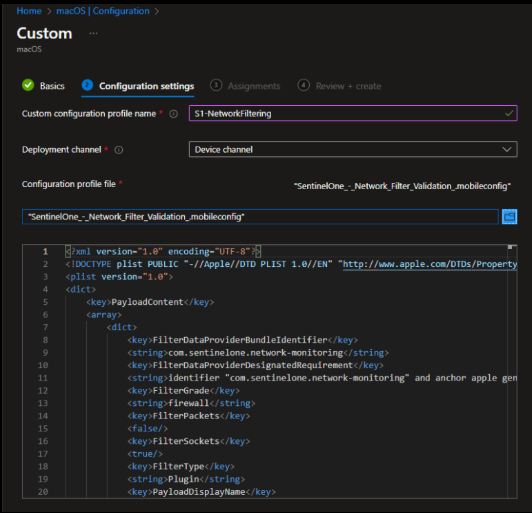
c) Provide a name for the Intune policy, and then click Next to continue to the configuration settings.
Enter the profile name. This name will appear in the macOS Settings on the device.
Select the deployment channel as Device Channel.
Browse and upload the
.mobileconfigfile.Click Next
d) Assign to your target groups, and then repeat these steps for the other three profiles
FAQ
1) How do I deploy SentinelOne on macOS using Microsoft Intune?
Upload the SentinelOne PKG to secure storage, create custom macOS configuration profiles in Intune, upload required .mobileconfig files, and assign them to device groups.
2) What profiles are required for SentinelOne macOS Intune deployment?
You must deploy Network Monitoring, Privacy Control, Notifications, and Network Filtering profiles to ensure full functionality and avoid user prompts.
3) Where should I host the SentinelOne macOS PKG file?
Host the PKG file on Azure Blob Storage, a secure web server, or an internal repository accessible to enrolled macOS devices.
4) Why are macOS configuration profiles required for SentinelOne?
macOS requires explicit system permissions for extensions, filtering, and monitoring. Profiles pre-approve these settings for silent, zero-touch deployment.
5) What deployment channel should be used in Intune for macOS profiles?
Use the Device Channel when creating custom macOS configuration policies to ensure proper system-level approval and enforcement.
Need help securing your environment?
Talk to a NetNXT security expertStay ahead of the next vulnerability
New KB guides, threat advisories and hardening playbooks from NetNXT's security team — straight to your inbox.
NetNXT will handle your data pursuant to its Privacy Policy.
Like this guide? Join our team.
NetNXT builds security for how modern enterprises actually run.
View open roles