
How Do You Block Personal Google Account Login in Chrome While Allowing Workspace Access via JumpCloud?
Learn how to block personal Google account logins in Chrome while allowing corporate Google Workspace access using JumpCloud Chrome policies. Includes Regex-based sign-in restriction, validation behavior, and user experience outcomes on managed Windows devices.
On this page
You block personal Google logins in Chrome by deploying the RestrictSigninToPattern policy through JumpCloud — the GUI browser policy on Windows, or an MDM Custom Profile on macOS — set to a regex matching your corporate domain. This restricts which account can become the Chrome browser profile account. It does not block a user from signing in to a personal Gmail account on gmail.com inside the browser. Blocking that requires the X-GoogApps-Allowed-Domains HTTP header, which must be injected by a proxy or SSE platform performing TLS inspection. Both layers are covered below.
Overview
To prevent data exfiltration, administrators need users signed in to corporate Google Workspace accounts (@yourdomain.com) and blocked from personal Google accounts (@gmail.com). There are two distinct control points, and conflating them is the most common reason a deployment appears to fail:
Layer | What it controls | How it is deployed | What it stops |
|---|---|---|---|
1. Browser profile restriction | Which Google account can be set as the Chrome browser's primary (profile/sync) account | Chrome policy via JumpCloud — GUI on Windows, | Corporate bookmark/history sync to a personal account; the browser profile itself being a personal identity |
2. Web session restriction | Sign-in to Google consumer services in the content area — gmail.com, Drive, Docs |
| A user opening gmail.com and signing in to a personal account |
Layer 1 alone does not achieve layer 2. Google's RestrictSigninToPattern policy is documented as controlling which accounts "can be set as browser primary accounts" — the Sync opt-in flow. A user on a device with only layer 1 applied can still open a new tab, go to gmail.com, and sign in to a personal account. If your goal is stopping data leaving through personal Gmail or Drive, you need both layers.
This guide is for IT and security administrators managing Windows and macOS fleets through JumpCloud, with Google Workspace as the corporate identity.
Expected outcome: the Chrome browser profile restricted to your corporate domain on both platforms, a clear understanding of what that does and does not prevent, and the configuration path for the web-session layer when you need it.
Prerequisites
JumpCloud administrator access with rights over Device Management → Policy Management
Your corporate Google Workspace domain, e.g.
yourdomain.comDevice groups in JumpCloud for the Windows and macOS fleets you intend to scope
For macOS: ability to generate a UUID (
uuidgenin Terminal) for the profile payloadFor layer 2 only: a proxy or SSE platform capable of HTTP header insertion with TLS inspection enabled — see that section for prerequisites
Layer 1: Restrict the Chrome Browser Profile Account
Windows: JumpCloud GUI Policy
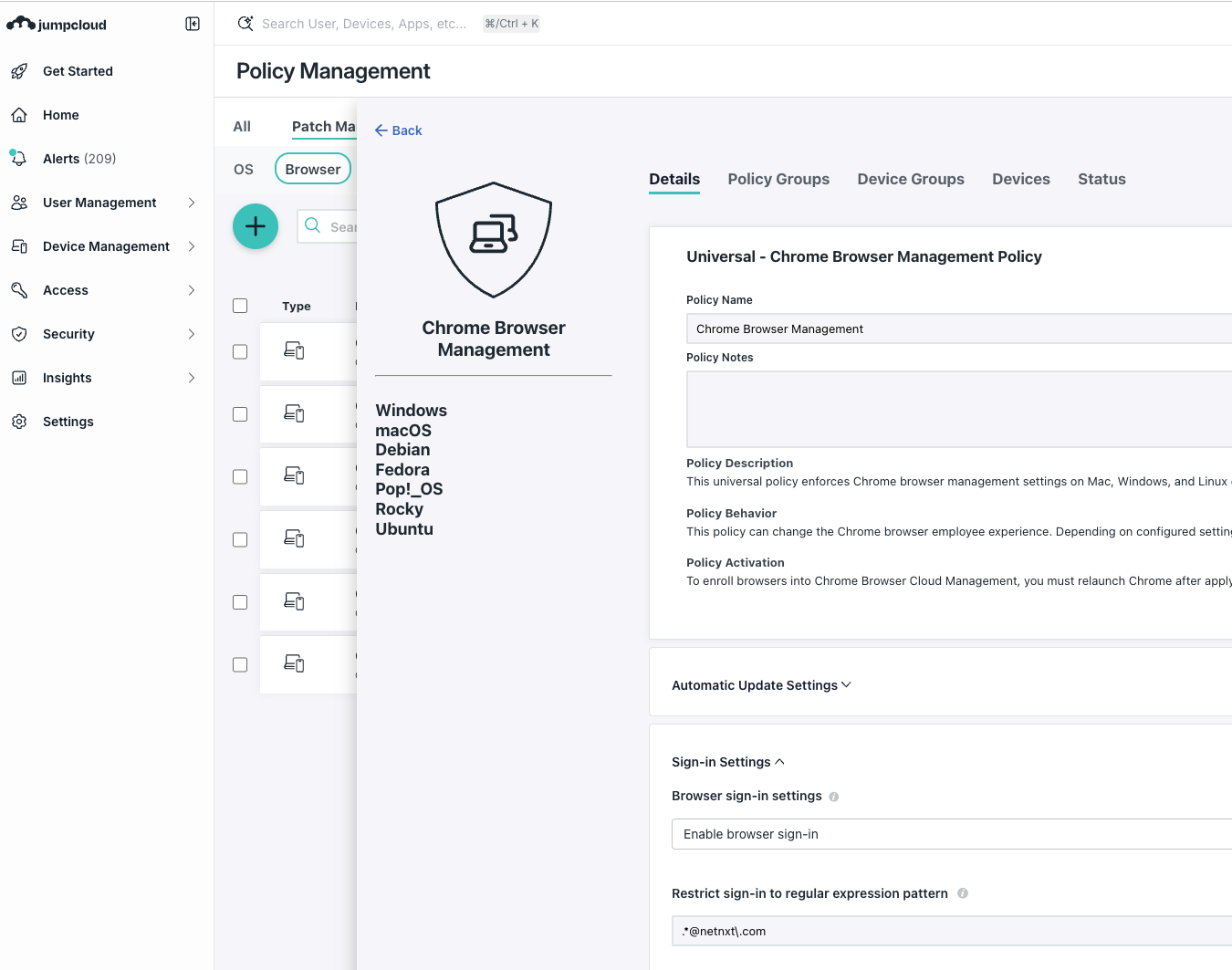
JumpCloud has a native configuration interface for Google Chrome on Windows.
Log in to the JumpCloud Admin Portal.
Navigate to Device Management → Policy Management → Browser.
Click (+).
Search for Google Chrome and select the Google Chrome Browser Preferences policy (or the Google Chrome administrative template, if available in your tenant).
Locate and configure: Sign In Settings → Restrict sign-in to regular expression pattern
Status: Enabled
Value:
.*@yourdomain\.com
Scope: apply to your Windows device group, then Save.
On the regex
Use .*@yourdomain\.com. The .* is a wildcard matching any username; the backslash escapes the dot so it matches a literal . rather than any character. Without the escape, .*@yourdomainXcom would also match — unlikely to be exploited, but the escaped form is correct and costs nothing.
Verify the console path. JumpCloud's policy categories move between releases. If Browser is not directly under Policy Management in your tenant, check under the Windows policy group listing. The policy name is the reliable anchor, not the path.
macOS: MDM Custom Profile
For macOS, deploy a .mobileconfig profile defining the Chrome policies directly.
Step 1: Generate your own UUIDs
Before anything else, generate two fresh UUIDs:
bash
uuidgen
uuidgen
Do not reuse the UUIDs from any published example, including this one. PayloadUUID values must be unique per profile per organisation; duplicates cause profile-installation conflicts on devices that already carry a profile with the same identifier.
Step 2: Create the profile
Create a file named BlockPersonalGmail.mobileconfig. Replace netnxt.com with your domain, com.netnxt.* with your own reverse-DNS identifiers, and both PayloadUUID values with the ones you generated.
xml
<?xml version="1.0" encoding="UTF-8"?>
<!DOCTYPE plist PUBLIC "-//Apple//DTD PLIST 1.0//EN" "http://www.apple.com/DTDs/PropertyList-1.0.dtd">
<plist version="1.0">
<dict>
    <key>PayloadContent</key>
    <array>
        <dict>
            <key>PayloadDescription</key>
            <string>Restricts Google Sign-in to Corporate Domains only.</string>
            <key>PayloadDisplayName</key>
            <string>Chrome - Block Personal Gmail</string>
            <key>PayloadIdentifier</key>
            <string>com.netnxt.chrome.restriction</string>
            <key>PayloadType</key>
            <string>com.google.Chrome</string>
            <key>PayloadUUID</key>
            <string>REPLACE-WITH-YOUR-OWN-UUID</string>
            <key>PayloadVersion</key>
            <integer>1</integer>
            <key>RestrictSigninToPattern</key>
            <string>.*@netnxt\.com</string>
            <key>SecondaryGoogleAccountSigninAllowedDomains</key>
            <array>
                <string>netnxt.com</string>
            </array>
        </dict>
    </array>
    <key>PayloadDisplayName</key>
    <string>Chrome Enterprise - Domain Restriction</string>
    <key>PayloadIdentifier</key>
    <string>com.netnxt.profile.chrome</string>
    <key>PayloadType</key>
    <string>Configuration</string>
    <key>PayloadUUID</key>
    <string>REPLACE-WITH-YOUR-OWN-UUID</string>
    <key>PayloadVersion</key>
    <integer>1</integer>
</dict>
</plist>
Step 3: Upload to JumpCloud
JumpCloud Admin Console → Device Management → Policy Management → (+) → Mac → MDM Custom Profile
Upload the
.mobileconfigfile.Bind it to your Mac device group.
Save.
What each key does
Key | Purpose |
|---|---|
| Regex determining which Google account can become the Chrome browser primary account |
| Intended to limit which domains can be added as secondary accounts in Chrome. Verify on your own managed Mac — Google documents the secondary-accounts control primarily as a ChromeOS setting, and desktop Chrome behaviour should be confirmed before you rely on it |
| Targets Chrome's managed preferences domain |
Layer 2: Restrict Sign-In on Google Web Services
This is the layer that stops a user opening gmail.com and signing in to a personal account. It cannot be done with a Chrome policy pushed from an MDM.
How it works
Google supports an HTTP header, X-GoogApps-Allowed-Domains, which restricts which accounts may sign in to Google services. It is added to traffic destined for *.google.com:
X-GoogApps-Allowed-Domains: yourdomain1.com, yourdomain2.comValues may include specific domains, plus the keywords:
Value | Meaning |
|---|---|
| Permit accounts in this domain |
| Permit personal Gmail accounts |
| Permit users without a Google Account |
| Permit service accounts |
To block personal accounts, list only your corporate domain(s) and omit consumer_accounts.
When a blocked account attempts to sign in, Google returns:
"This account is not allowed to sign in within this network."
This is the error message frequently attributed to Chrome sign-in policies. It comes from this header, not from RestrictSigninToPattern.
Deployment options
Option A — web proxy or SSE platform with header insertion. Because the header must be added to HTTPS traffic bound for Google, the platform must terminate and inspect TLS. Google's documentation is explicit that SSL interception capability is required.
If you run Cato Networks, this is available as a Tenant Restrictions Policy:
Cato Management Application → Security → App & Data Inline → Tenant Restriction → New
Setting | Value |
|---|---|
Application | Google Workspace |
Header name |
|
Header value | your corporate domain |
Prerequisites per Cato's documentation: TLS Inspection must be enabled with a TLS Inspection policy matching the relevant traffic, and a CASB licence is required. Cato's Tenant Restrictions also covers Microsoft 365, Slack, Dropbox, ChatGPT and Claude — worth configuring in the same pass if personal-account use is a concern across those too.
Other SSE and SWG platforms offer equivalent header-insertion capability under names such as tenant restriction or HTTP header injection. Confirm against your own platform's documentation.
Option B — ChromeOS managed devices. On ChromeOS, use the Sign-in to secondary accounts setting in Chrome Settings, restricting users to your Google Workspace domains. This is the native path and needs no proxy.
Coverage and limits — read this before promising it to stakeholders
The header blocks sign-in to Google consumer services other than Google Search.
It also affects the Google Cloud console, the
gcloudCLI and related tooling. Scope your TLS inspection policy accordingly or you will break your engineers' workflow.Services requiring no authentication remain accessible.
It applies only to traffic passing through the inspecting platform. A user on a personal device, or off-network where the SSE client is not steering, is unaffected. Layer 2 is a network control, not a device control.
Misconfiguration can block all accounts, including your corporate domain. Test on a pilot group before fleet-wide rollout, and know how to roll the rule back quickly.
Validation: How to Verify Each Layer
Test the two layers separately. This is the step both of the earlier versions of this guide ran together, which is why results did not match expectations.
Allow 30 minutes for policy propagation before testing.
Layer 1 — browser profile restriction
On macOS, confirm the profile landed:
bash
profiles show -type configuration | grep -i chromeConfirm Chrome received the policy — on both platforms, open:
chrome://policyExpect RestrictSigninToPattern listed with your regex as its value and a status of OK. If the policy is absent, the problem is delivery (MDM profile or JumpCloud policy scope), not Chrome. chrome://policy is the single most useful diagnostic here and neither earlier version of this guide mentioned it.
Test the behaviour: in Chrome, go to Settings → You and Google → Turn on sync and attempt to sign in with a personal Gmail account. Expected: Chrome refuses and shows an error that the account is not permitted. Then repeat with a corporate Workspace account — it should proceed normally.
Layer 2 — web session restriction
Only test this once the header injection is actually configured.
Confirm the header is being added:
bash
curl -sI https://accounts.google.com | grep -i googappsRun this from a device behind the inspecting platform. If the header is absent, the rule is not matching that traffic — check the TLS inspection policy before anything else.
Test the behaviour: navigate to gmail.com and attempt to sign in with a personal account, e.g. user123@gmail.com. Expected: "This account is not allowed to sign in within this network." Then sign in with employee@yourdomain.com — this should proceed normally.
If the personal login succeeds, the header is not reaching Google's servers for that request. If the corporate login also fails, the header value is wrong — check for a missing domain or a stray space.
Troubleshooting
Problem: Personal Gmail login at gmail.com still works after deploying the JumpCloud Chrome policy. Cause: Expected behaviour. RestrictSigninToPattern governs the browser primary account only, not sign-in within the content area. Fix: Deploy layer 2. There is no Chrome policy that achieves this from an MDM alone.
Problem: chrome://policy does not list the policy at all. Cause: The policy never reached the device — wrong device group scope, profile not installed, or propagation still in progress. Fix: On macOS verify with profiles show -type configuration | grep -i chrome; on Windows confirm the JumpCloud policy is bound to the correct device group. Then use Reload policies on the chrome://policy page.
Problem: macOS profile fails to install. Cause: Duplicate PayloadUUID or PayloadIdentifier colliding with an existing profile — usually from copying UUIDs out of a published example. Fix: Generate fresh UUIDs with uuidgen, use your own reverse-DNS identifiers, and re-upload.
Problem: The regex allows accounts it should not, e.g. user@yourdomainXcom. Cause: Unescaped dot in the pattern — . matches any character in a regex. Fix: Use .*@yourdomain\.com.
Problem: After enabling header injection, all Google accounts are blocked including corporate ones. Cause: Malformed header value — missing domain, wrong separator, or extra whitespace. Fix: Confirm the emitted header with curl -sI https://accounts.google.com | grep -i googapps, and check the value is a comma-separated list of bare domains. Roll the rule back while you diagnose rather than leaving the fleet locked out.
Problem: The gcloud CLI or Google Cloud console stops working. Cause: The header affects Cloud tooling as well as consumer services. Fix: Add gserviceaccounts.com to the header value where service accounts are in use, or scope your TLS inspection policy to exclude the relevant paths. Test with the engineering team before rolling out broadly.
Security and Best Practices
Don't mistake layer 1 for a data-exfiltration control. Restricting the browser profile account stops corporate sync to a personal identity. It does not stop a user attaching a file to personal Gmail. If exfiltration is the actual risk you are addressing, layer 1 alone gives you a false sense of coverage — and that is worse than knowing you have a gap.
Layer 2 is a network control, not a device control. It applies where traffic is inspected. Personal devices, and managed devices off-network with no SSE client steering, are outside it. Pair it with device posture requirements if the risk warrants.
Pilot before fleet-wide, always. Both layers can lock out legitimate users — layer 1 through a wrong regex, layer 2 through a wrong header value. Use a pilot group of 5–10 devices and a documented rollback.
Scope TLS inspection deliberately. Inspecting all Google traffic has side effects on Cloud tooling, certificate-pinned applications and some native clients. Decide what you inspect rather than inspecting everything and reacting to tickets.
Layer on DLP rather than relying on sign-in blocks. Blocking personal Google accounts closes one channel. Data still leaves through other SaaS, personal email on other providers, and GenAI tools. Sign-in restriction is one control in a set, not a solution by itself.
Document which layer you deployed. When someone asks in six months whether personal Gmail is blocked, "we pushed the Chrome policy" and "we block consumer accounts at the network" are very different answers. Write down which one is true.
When to Handle This Internally, and When to Bring in Help
Layer 1 is straightforward. The policy is in this article, JumpCloud delivers it, and an administrator can have both platforms scoped inside an hour. Do it yourself.
Layer 2 is where this stops being a policy task:
It needs TLS inspection on a platform you may not have. If you have no SSE, SWG or inspecting proxy, layer 2 is not a configuration change — it is an infrastructure decision.
Scoping inspection without breaking things takes judgement. Certificate-pinned apps,
gcloud, native mail clients and single-sign-on flows all react to interception. Getting this wrong generates the kind of intermittent breakage that is difficult to attribute and erodes trust in the security team.The failure mode is total. A malformed header locks out every Google account in the organisation, including yours. Teams that have done this before know how to stage and roll back; teams doing it for the first time on a Friday do not.
Personal-account use is rarely limited to Google. If it is a real concern, it applies to Microsoft 365, Slack, Dropbox and GenAI tools as well. Configuring these one platform at a time, reactively, produces an inconsistent estate. Designing the set once is considerably cheaper.
If exfiltration is the actual driver, sign-in blocking is the wrong starting point. The question to answer first is what data matters and where it goes — then which controls close those paths. That is a scoping exercise, not a policy push.
NetNXT designs and operates these controls across Cato, Netskope and JumpCloud estates — tenant restrictions, TLS inspection scoping that does not break production applications, and DLP policy covering the channels a sign-in block leaves open. If you have layer 1 in place and are trying to work out what layer 2 costs you in risk and effort, that conversation is a short one.
FAQs
1) How do you block personal Google account login in Chrome while allowing Workspace access?
Use two layers. Deploy the Chrome RestrictSigninToPattern policy through JumpCloud — the Browser policy GUI on Windows, or an MDM Custom Profile with a .mobileconfig on macOS — set to .*@yourdomain\.com. This restricts the browser's primary account. To also block personal sign-in on gmail.com and Drive, you need the X-GoogApps-Allowed-Domains HTTP header injected by a proxy or SSE platform with TLS inspection enabled, listing only your corporate domain.
2) Why does personal Gmail login still work after applying the Chrome sign-in restriction policy?
Because RestrictSigninToPattern controls only which Google account can be set as the Chrome browser primary account during the Sync opt-in flow. It does not affect sign-in to Google web services in the content area, so a user can still open gmail.com and sign in to a personal account. Blocking that requires the X-GoogApps-Allowed-Domains header, which an MDM-delivered Chrome policy cannot provide.
3) What produces the error "This account is not allowed to sign in within this network"?
The X-GoogApps-Allowed-Domains HTTP header. When a proxy or SSE platform adds this header to traffic bound for *.google.com and the signing-in account's domain is not in the list, Google returns that message. The error is often mistakenly attributed to Chrome sign-in policies — it is a network-layer control, not a browser policy.
4) What regex pattern restricts Chrome sign-in to corporate Workspace accounts?
Use .*@yourdomain\.com. The .* matches any username and the escaped \. matches a literal dot. Omitting the escape means the dot matches any character, so user@yourdomainXcom would also be permitted. Set it in JumpCloud under Sign In Settings → Restrict sign-in to regular expression pattern, or as the RestrictSigninToPattern key in a macOS .mobileconfig.
5) How do you verify the Chrome domain restriction is actually active?
Open chrome://policy on the managed device and confirm RestrictSigninToPattern appears with your regex and a status of OK. On macOS, also confirm profile delivery with profiles show -type configuration | grep -i chrome. For the web-session layer, run curl -sI https://accounts.google.com | grep -i googapps from behind the inspecting platform to confirm the header is being injected. Test behaviour with both a personal and a corporate account.
Need help securing your environment?
Talk to a NetNXT security expertStay ahead of the next vulnerability
New KB guides, threat advisories and hardening playbooks from NetNXT's security team — straight to your inbox.
NetNXT will handle your data pursuant to its Privacy Policy.
Like this guide? Join our team.
NetNXT builds security for how modern enterprises actually run.
View open roles